Logging, Monitoring, and Observability for Web Apps
I walk through the three observability signals — structured logs, metrics, and distributed traces — and show how to set up Pino in Node.js.
Most production apps have some form of monitoring: error rate alerts, uptime checks, maybe CPU graphs. That feels like enough until you’re debugging a live incident and realise none of it tells you which request failed, which user triggered it, or which code path is responsible. Monitoring tells you that something broke. Observability tells you why.
I’m going to walk through the three signals that make a system observable — logs, metrics, and distributed traces — and show how to build a practical logging foundation in Node.js with Pino that actually helps you debug production.
On this page
- Why monitoring isn’t observability
- Structured logs: the foundation
- Metrics: counters, gauges, and histograms
- Distributed tracing: following a request across services
- A practical Node.js setup with Pino
- What breaks in production
- Treat observability as infrastructure, not an afterthought
Why monitoring isn’t observability
Monitoring is reactive and predefined. You decide in advance what to watch — HTTP error rate, database query time, memory usage — set thresholds, and get alerts when they breach. It works well for failure modes you can predict.
Observability is different. As OpenTelemetry defines it, observability lets you understand a system from the outside by letting you ask questions about it without knowing its inner workings in advance. The key difference is that word “ask.” With monitoring, the question is always “is this predefined metric above or below a threshold?” With observability, you can ask questions you didn’t think of when you first set everything up.
The practical consequence: with monitoring, you know your error rate spiked at 2pm. With observability, you can ask “which segment of users triggered that spike, on which endpoint, through which code path?” You can only answer the second question if you emitted the right signals before the incident happened.
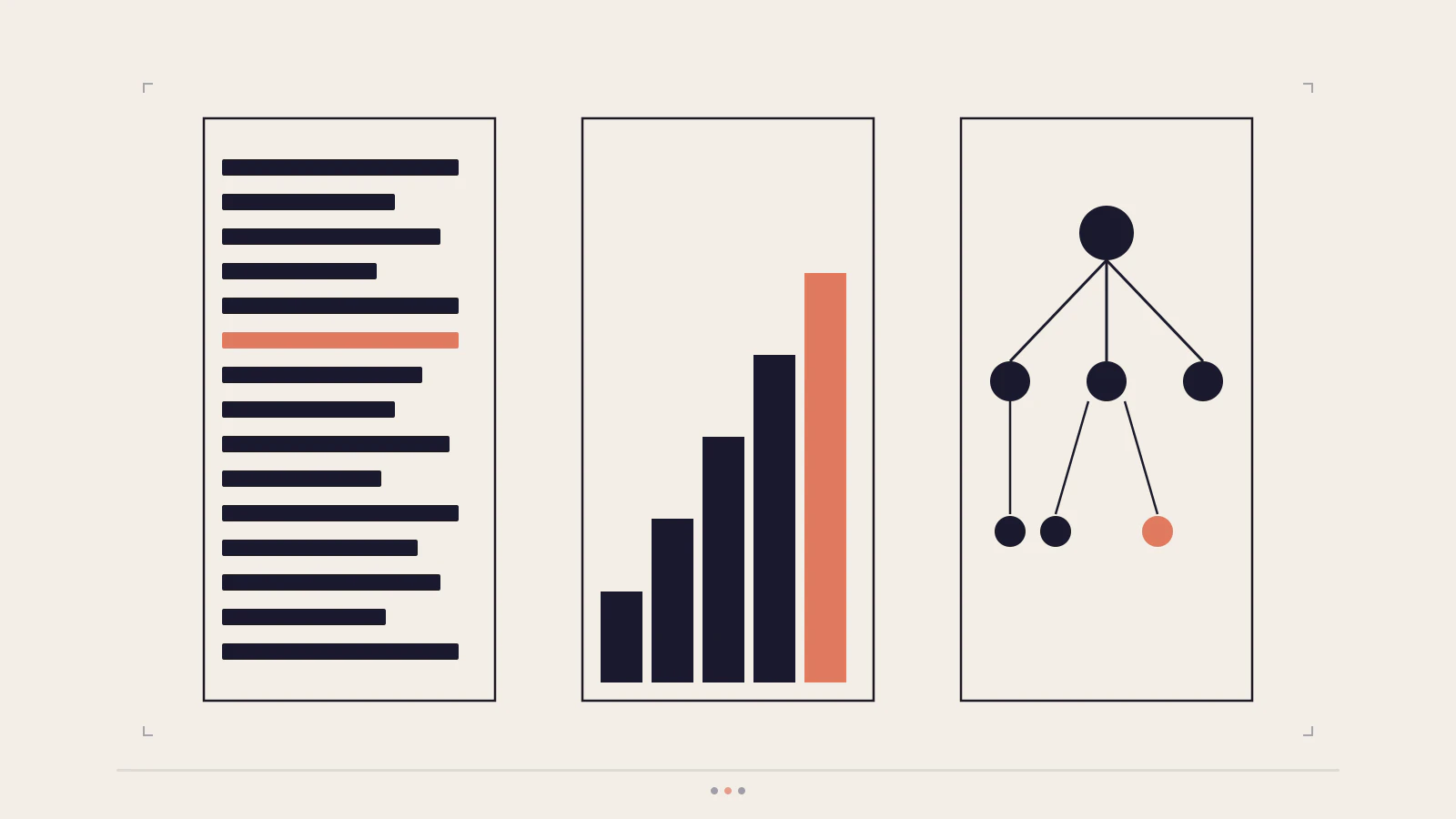
OpenTelemetry defines three signals that together make a system observable: logs, metrics, and traces. They’re complementary — each one answers questions the other two cannot. Adding all three isn’t premature complexity. It’s the difference between having a map and having a compass.
Structured logs: the foundation
Most server-side logging starts with console.log. That’s fine for local debugging. In production, plain text logs are nearly impossible to correlate. When 50 requests hit your API concurrently, free-form strings don’t tell you which lines belong to which request, which user, or which service instance triggered them.
Structured logging fixes this by writing logs as JSON objects. Every field is machine-searchable, so your logging platform can filter, aggregate, and alert on specific values.
Pino is the standard structured logger for Node.js — one of the fastest available, using a single-stream approach that defers pretty-printing to a separate process. The setup is minimal:
import pino from "pino";

export const logger = pino({
  level: process.env.LOG_LEVEL ?? "info",
  transport:
    process.env.NODE_ENV !== "production"
      ? { target: "pino-pretty" }
      : undefined,
});
In production, Pino writes newline-delimited JSON to stdout and your platform ingests it. In development, pino-pretty formats the output for the terminal. The LOG_LEVEL environment variable lets you turn up verbosity in staging without touching code.
Pino supports six log levels in ascending severity: trace, debug, info, warn, error, and fatal. Setting level: "info" silences trace and debug in production, which matters when request volume is high. The levels aren’t arbitrary: warn means “this succeeded but something looks off”; error means “something failed and needs attention.”
logger.info({ port: 3000, env: "production" }, "Server started");
logger.warn({ userId: "u_123", action: "payment_retry" }, "Payment retry triggered");
logger.error({ err }, "Unhandled database error");
That err field is important. Pino serializes error objects into a JSON-friendly format including the message and stack trace. If you log logger.error("Database error") instead of logger.error({ err }, "Database error"), you lose the stack trace entirely — and the stack trace is usually the part that tells you what actually went wrong.
Correlation IDs are what turn individual log lines into a story. A correlation ID — sometimes called a request ID — is a UUID generated at the start of each incoming request and attached to every log line that request produces. Pino’s child logger makes this straightforward:
import { randomUUID } from "crypto";

app.use((req, res, next) => {
  const correlationId =
    (req.headers["x-correlation-id"] as string) ?? randomUUID();
  res.setHeader("x-correlation-id", correlationId);
  res.locals.log = logger.child({ correlationId });
  next();
});
Every call to res.locals.log.info(...) in a route handler now includes correlationId automatically. When you search your log aggregator for a specific ID, you get every log line that request produced — across all functions, and across downstream services if you forward the header along with outbound calls.
If you already have an Express project, the production Express project structure post covers where to put the logger module and how to wire it into your middleware chain. For error handling that works well with structured logging, Centralized Error Handling in Node.js APIs shows how to pass errors through to a single handler that can log them consistently.
Check this before moving on
- You understand why
logger.error({ err }, "message")is better thanlogger.error("message")for debugging - You understand how a child logger inherits the parent’s configuration and extends it with new fields
- You can explain what a correlation ID is and why it travels with the request, not just the server
Metrics: counters, gauges, and histograms
Logs tell you what happened to specific requests. Metrics aggregate behaviour across all requests over time — they answer “how many times did this happen in the last 5 minutes?” rather than “what did this particular request do?”
OpenTelemetry’s metrics specification defines several instrument types. Three are most useful to understand early:
- Counter: Accumulates over time and only goes up. Total HTTP requests, error count, tasks processed. Use for anything you measure by “how many have occurred.”
- Gauge: Represents the current value at the moment of observation. Active database connections, memory usage, queue depth. Use for anything that can increase and decrease.
- Histogram: Captures a distribution of values. Request latency is the canonical use case — a single average conceals whether your p95 latency is 200ms or 2 seconds. A histogram lets you ask “how many requests took longer than 500ms?”
The distinction between a counter and a gauge matters in practice. Memory usage is a gauge — you care what it is right now. Error count is a counter — you care how many have accumulated in the past N minutes.
Metrics connect observability to alerting. A practical starting set for any web API:
| Signal | What to measure | Reasonable alert condition |
|---|---|---|
| Error rate | Ratio of 5xx responses to total requests | > 1% over a 5-minute window |
| Latency | p95 response time | > 1,000ms |
| Throughput | Requests per second | Sudden drop of > 30% |
| Availability | Uptime check success | Any failure in the last 5 minutes |
These thresholds aren’t universal — your acceptable latency depends on what the endpoint does and what your users expect. What matters is deciding them before you need them, not after the first 3am incident.
Distributed tracing: following a request across services
With logs and metrics in place, there’s still a gap: when a request touches multiple services, neither one tells you how time was actually spent across the chain. If your checkout API call takes 3 seconds, was the database slow? The inventory service? A network round trip? Without tracing, you’re guessing.
Distributed tracing maps the complete path of a single request. Per OpenTelemetry’s tracing concepts, a trace is composed of spans — each span represents one unit of work. Spans carry a parent-child relationship: the root span is the entire incoming request, and child spans represent individual operations within it.
A trace for a checkout request might look like this:
Checkout endpoint (root span: 340ms total)
├── Validate session token (8ms)
├── Query cart from database (12ms)
├── Call inventory service (270ms)   ← 79% of total time
│   └── Inventory DB read (265ms)
└── Return response (2ms)
That waterfall view tells you immediately that the inventory service’s database read is consuming 78% of the total request time. Without the trace, you’d stare at a slow endpoint and start guessing where to look.
OpenTelemetry has stable JavaScript support and can automatically instrument popular Node.js frameworks including Express. At the scale of a single monolith this is optional. Once you’re distributing work across multiple services — which the system design scaling basics post covers in depth — tracing quickly becomes the tool you miss most when you don’t have it.
A practical Node.js setup with Pino
Here’s a minimal but production-useful starting point. It wires together a Pino logger, per-request correlation IDs, and a health endpoint:
import express from "express";
import pino from "pino";
import { randomUUID } from "crypto";

const logger = pino({
  level: process.env.LOG_LEVEL ?? "info",
  transport:
    process.env.NODE_ENV !== "production"
      ? { target: "pino-pretty" }
      : undefined,
});

const app = express();

// Attach a request-scoped child logger to every request
app.use((req, res, next) => {
  const correlationId =
    (req.headers["x-correlation-id"] as string) ?? randomUUID();
  res.setHeader("x-correlation-id", correlationId);
  res.locals.log = logger.child({
    correlationId,
    method: req.method,
    path: req.path,
  });
  (res.locals.log as pino.Logger).info("Request received");
  next();
});

// Health endpoint — used by load balancers, container probes, and uptime monitors
app.get("/health", (_req, res) => {
  res.json({
    status: "ok",
    uptime: process.uptime(),
    timestamp: new Date().toISOString(),
  });
});

app.listen(3000, () => logger.info({ port: 3000 }, "Server ready"));
The health endpoint is worth calling out. A /health route that returns structured JSON lets your load balancer, Kubernetes readiness probe, and uptime monitor confirm the service is alive. Including uptime makes it easy to detect when a deployment happened — uptime resets to zero. Including timestamp makes clock drift visible if you’re comparing logs across services.
If you’re adding this logger to a REST API, the Building a REST API with Node.js and Express post shows the routing structure this setup plugs into naturally.
Try this
- Add Pino to an existing Node.js project:
npm install pino pino-pretty- Replace
console.logcalls withlogger.info(...)— pass an object as the first argument, the message as the second- Start the server and make a request — note the structured JSON output in the terminal
Expected result: Each log line is a JSON object with
level,time,pid,hostname,msg, and any fields you passed. ChangeLOG_LEVELtodebugand re-run — debug-level lines appear that were previously silenced.
What breaks in production
Logging at the wrong level. Setting everything to debug in production generates enormous log volume and buries the signals you care about in noise. Setting everything to error means you miss the warn-level signals that often precede failures. A useful rule: log what changes the outcome of a request — the start and end of transactions, non-happy-path branches, and every external service call with its response time.
Logging sensitive data. Logging req.body or full request headers is a common mistake. User passwords, session tokens, card numbers, and API keys can end up in your log platform if you’re not careful. Pino’s redact option lets you scrub specific paths before they’re written:
const logger = pino({
  level: process.env.LOG_LEVEL ?? "info",
  redact: ["req.headers.authorization", "body.password", "body.token"],
});
Ignoring high-cardinality in metric labels. The OpenTelemetry SDK enforces a default cardinality limit of 2,000 unique attribute combinations per metric stream. If you use raw URL paths as metric labels — /users/a42f9b instead of /users/:id — you’ll hit this limit quickly, and your error-rate alerts can silently stop firing. Group high-cardinality values into route patterns before using them as labels.
Missing correlation IDs in downstream calls. A correlation ID is only useful if it travels with the request. If your service calls another service without forwarding x-correlation-id, the downstream logs for that call are disconnected from the original request. Forward the header explicitly on every outbound HTTP call your service makes.
Treat observability as infrastructure, not an afterthought
The reason observability gets skipped on early projects is that it feels like extra work before you’ve proven the product. That logic breaks down fast once you have real users and real incidents.
The starting point is small: add Pino, output structured JSON, attach a correlation ID to every incoming request, add a /health endpoint. That’s a meaningful improvement over console.log and takes less than an hour to wire in. Metrics and distributed tracing come next, as traffic and service complexity grow.
The shift the three signals force is useful: stop thinking about your application as something you deploy and hope works, and start thinking about it as something you need to be able to interrogate — at 3am, from a cold start, without the person who originally wrote the code.
Logs tell you what happened to specific requests. Metrics tell you how the system behaved in aggregate. Traces tell you where the time actually went. Together they make the difference between guessing and knowing.
The three observability signals side by side: structured logs on the left record what happened, metrics in the middle show how the system behaved over time, and traces on the right reveal the path a specific request took through your services.