Structuring a Production-Ready Express Project
I walk through the Express folder layout that scales — separating routes, controllers, services, and middleware into layers with one job each.
The first Express app most developers write puts everything in one file — routes, database queries, validation, and app.listen() living side by side. For the first hundred lines, that feels fine. Clean, even.
Then you add a second resource. And authentication. And shared validation logic that five routes need. Suddenly, debugging a user endpoint means scrolling through the same file that also contains your database connection, your error handling, and three unrelated route handlers. You can’t test a service function without spinning up the full HTTP server. You can’t reuse validation logic without copying it.
Express doesn’t impose any structure on you — that’s intentional. It gives you the pieces and lets you decide where they go. But “no required structure” and “any structure works” aren’t the same thing. The layout you choose in week one tends to stick.
Quick answer: Separate your project into
routes/(URL definitions),controllers/(HTTP handling),services/(business logic),middleware/(cross-cutting concerns), andconfig/(environment variables loaded once). Routes delegate to controllers, controllers call services, services do the actual work. Each layer stays ignorant of the layers above it.
Series: Part 2 of the Express series.
On this page
- Why a flat file stops scaling
- The folder layout
- Routes, controllers, and services — one job each
- Wiring middleware in the right order
- Environment config in one module
- Where this structure creates friction
- Structure is a constraint, not a solution
Why a flat file stops scaling
Here’s what a flat app.js looks like after a few months:
import express from "express";
import { pool } from "./db.js";

const app = express();
app.use(express.json());

app.get("/users/:id", async (req, res) => {
  if (!req.params.id) return res.status(400).json({ error: "Missing id" });
  const result = await pool.query(
    "SELECT * FROM users WHERE id = $1",
    [req.params.id]
  );
  if (!result.rows.length) return res.status(404).json({ error: "Not found" });
  res.json(result.rows[0]);
});

app.post("/users", async (req, res) => {
  const { name, email } = req.body;
  if (!name || !email) return res.status(400).json({ error: "Missing fields" });
  // Validation...
  // Database call...
  // More inline logic...
});

// 600 more lines follow
Nothing here is obviously wrong in isolation. The problem is coupling: HTTP handling, validation, and database queries are woven into the same function. You can’t test the user lookup without simulating an HTTP request. You can’t reuse the validation elsewhere without duplicating it. When you need to add authentication, you add it inside each handler individually.
The structure that solves this isn’t complex. It just requires drawing clear lines between what each part of your code is allowed to know.
The folder layout
The pattern that holds up over time looks like this:
src/
├── app.ts              ← Express instance, middleware stack
├── server.ts           ← Entry point, starts the HTTP server
├── config/
│   └── index.ts        ← Reads all env variables once at startup
├── routes/
│   ├── index.ts        ← Mounts all routers on the app
│   ├── users.routes.ts
│   └── posts.routes.ts
├── controllers/
│   ├── users.controller.ts
│   └── posts.controller.ts
├── services/
│   ├── users.service.ts
│   └── posts.service.ts
└── middleware/
    ├── auth.middleware.ts
    ├── error.middleware.ts
    └── validate.middleware.ts
Two entry points are intentional. app.ts configures the Express instance — registers middleware, mounts routers, sets up error handling. server.ts calls app.listen(). This separation means your tests can import the configured app object without binding a port. Testing HTTP behavior against the actual app becomes straightforward.
Routes, controllers, and services — one job each
The split that matters most is between controllers and services. It’s the layer developers most often skip, and the one that makes the biggest difference as the codebase grows.
Controllers handle HTTP. They read from req, call a service, and write to res. They know what a 404 status means. They don’t know how users are stored in the database.
Services do the actual work. They query databases, call external APIs, run business rules. They don’t know what HTTP method triggered them. They never touch req or res.
Here’s how this looks for a users resource. The route file wires URLs to controller functions using express.Router:
// src/routes/users.routes.ts
import { Router } from "express";
import { getUser, createUser } from "../controllers/users.controller";

const router = Router();

router.get("/:id", getUser);
router.post("/", createUser);

export default router;
The controller reads from req and delegates to the service:
// src/controllers/users.controller.ts
import type { Request, Response, NextFunction } from "express";
import { findUserById, insertUser } from "../services/users.service";

export async function getUser(
  req: Request,
  res: Response,
  next: NextFunction
) {
  try {
    const user = await findUserById(req.params.id);
    if (!user) return res.status(404).json({ error: "User not found" });
    res.json(user);
  } catch (err) {
    next(err);
  }
}

export async function createUser(
  req: Request,
  res: Response,
  next: NextFunction
) {
  try {
    const user = await insertUser(req.body);
    res.status(201).json(user);
  } catch (err) {
    next(err);
  }
}
The service does the database work with no knowledge of Express at all:
// src/services/users.service.ts
import { db } from "../config/database";

export async function findUserById(id: string) {
  const result = await db.query(
    "SELECT * FROM users WHERE id = $1",
    [id]
  );
  return result.rows[0] ?? null;
}

export async function insertUser(data: { name: string; email: string }) {
  const result = await db.query(
    "INSERT INTO users (name, email) VALUES ($1, $2) RETURNING *",
    [data.name, data.email]
  );
  return result.rows[0];
}
The payoff is testability. You can import findUserById directly in a test, mock the database connection, and verify the behavior without starting a server. The controller stays thin because it contains no business logic. The service stays clean because it contains no HTTP concerns.
If you’re working in TypeScript, this pattern becomes even cleaner — service functions get explicit return types that don’t bleed Express-specific shapes like Request or Response. The TypeScript generics post covers how to type generic result objects if you’re building services that return across multiple resource types.
Check this before moving on
- Each route file calls only controller functions — no inline
res.json() - Each controller touches
reqandres, calls a service, handlesnext - Each service function has zero references to
req,res, ornext
Wiring middleware in the right order
Middleware order in Express is processed top to bottom, and the position of each app.use() call determines what runs before your route handlers and in what sequence.
A standard middleware stack for a JSON API:
// src/app.ts
import express from "express";
import helmet from "helmet";
import { router } from "./routes";
import { errorHandler } from "./middleware/error.middleware";

const app = express();

// 1. Security headers — must run before anything reads the request
app.use(helmet());

// 2. Body parsing — must run before any route reads req.body
app.use(express.json());

// 3. Route handlers
app.use("/api", router);

// 4. Error handler — must be last, registered after all routes
app.use(errorHandler);

export { app };
The error handler placement is the one that catches people off guard. Express identifies error-handling middleware by its four-argument signature — (err, req, res, next). If you register it before your routes, errors from those routes skip it entirely. It must be last.
// src/middleware/error.middleware.ts
import type { Request, Response, NextFunction } from "express";

export function errorHandler(
  err: Error,
  req: Request,
  res: Response,
  _next: NextFunction
) {
  const status = (err as { status?: number }).status ?? 500;
  const isDev = process.env.NODE_ENV !== "production";
  res.status(status).json({
    error: isDev ? err.message : "Internal server error",
  });
}
The production check matters. The Express production best practices guide specifically calls out hiding verbose error messages from clients — stack traces and internal error details can expose implementation specifics you don’t want public.
Environment config in one module
Reading process.env.DATABASE_URL directly inside a service file is a habit that creates quiet problems. When the variable is missing, you get an undefined value that fails partway through a database operation rather than at startup. When you need to understand what your app requires to run, you’re forced to search the entire codebase.
One config/index.ts module reads and validates everything at boot:
// src/config/index.ts
if (!process.env.DATABASE_URL) {
  throw new Error("DATABASE_URL is required");
}
if (!process.env.JWT_SECRET) {
  throw new Error("JWT_SECRET is required");
}

export const config = {
  port: Number(process.env.PORT) || 3000,
  nodeEnv: process.env.NODE_ENV ?? "development",
  dbUrl: process.env.DATABASE_URL,
  jwtSecret: process.env.JWT_SECRET,
} as const;
The early throws are deliberate. A missing required variable causes a startup failure with a clear message rather than a runtime error after the first affected request. Every module that needs configuration imports from config/, never from process.env directly.
For loading the .env file, register your environment loader before anything else runs in server.ts:
// src/server.ts
import "dotenv/config"; // Must be first import
import { app } from "./app";
import { config } from "./config";

app.listen(config.port, () => {
  console.log(`Server running on port ${config.port}`);
});
Where this structure creates friction
This layout isn’t a guarantee. A few places where it tends to cause confusion:
Cross-resource service dependencies. When a posts service needs to look up a user, it imports from the users service. That’s fine. When three services form an import cycle, you have a design problem — usually a fourth shared module needs to exist. The structure makes cycles more visible, but it doesn’t prevent them.
Integration testing still needs a running server. The controller/service split makes unit testing simpler — test services directly with a mocked database. But testing full request/response behavior (auth headers, status codes, JSON shapes) still requires running the configured app. supertest works well for this: it accepts an Express app object and makes real HTTP requests without binding to a port.
Config validation grows. The single throw for a missing variable is fine early on. Larger projects usually graduate to a schema validation library to handle type coercion, default values, and multiple required fields together. The structure stays the same — every module imports from config/ — but the validation inside that module gets more explicit.
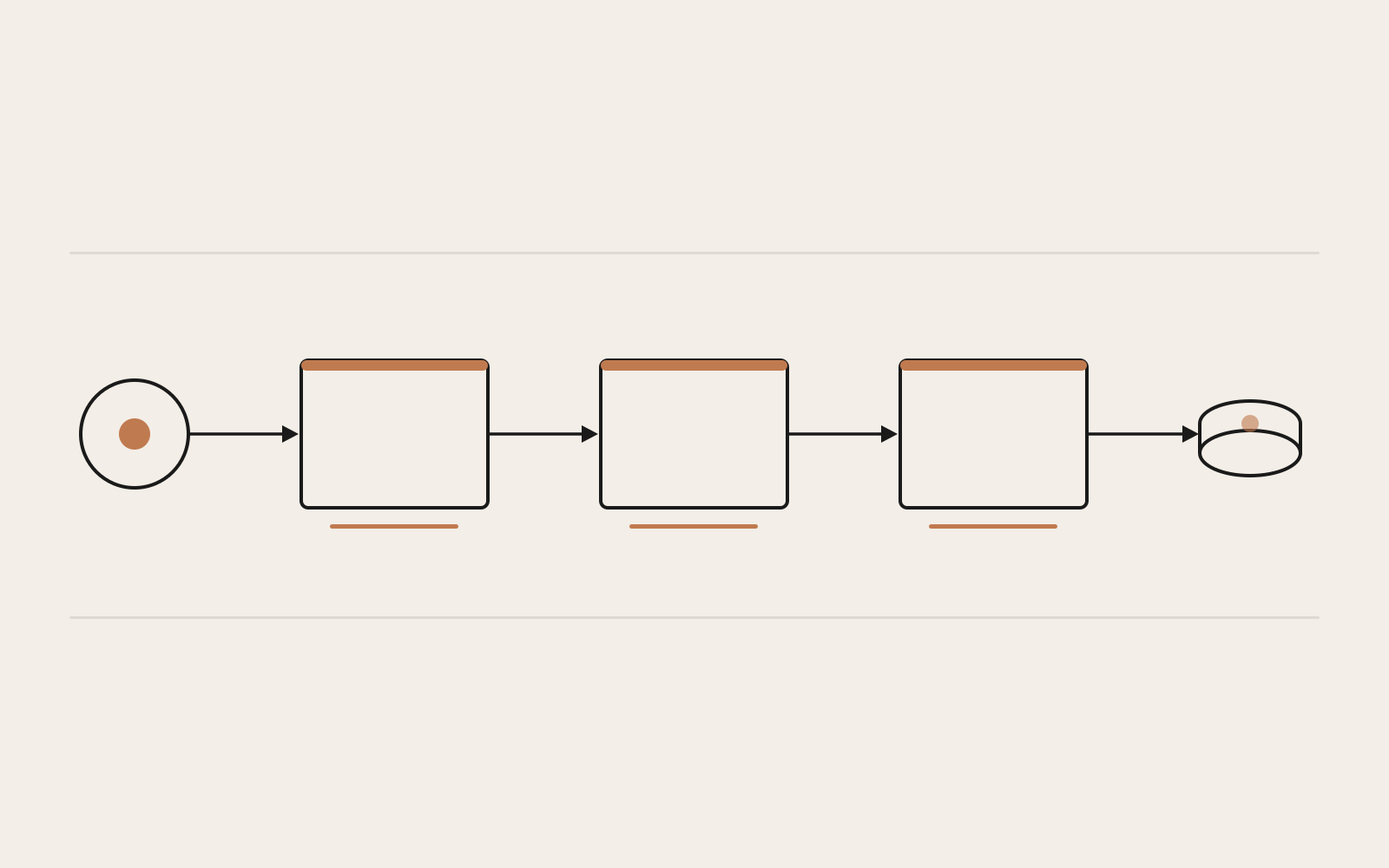
A request enters at the left, passes through the router, the controller, and the service before reaching the data store — each layer hands off to the next without overstepping.
Structure is a constraint, not a solution
Organising files into folders doesn’t prevent badly written code. A controller can still query a database directly if someone adds the import. A service can still reference req.body if someone passes it as a parameter. The structure only works if the team understands the intent behind it.
What it does well is make the wrong thing slightly obvious. A service file with an import express from "express" at the top is visually wrong in a way that a 600-line app.js would hide comfortably.
If you’re starting this kind of project in TypeScript, the controller pattern shown here fits naturally with the way TypeScript types request handlers. The TypeScript for JavaScript developers overview is a good starting point if you’re bringing TypeScript into an existing JavaScript project before applying this structure.
Add a schemas/ directory for validation when you need it. Add a lib/ directory for shared utilities. Let the actual project drive those additions. The router/controller/service separation is the part worth keeping stable.