How the Web Works: What Happens After You Hit Enter
I walk through every step between typing a URL and seeing a page, from DNS lookups and TCP handshakes to HTML parsing and the first paint.
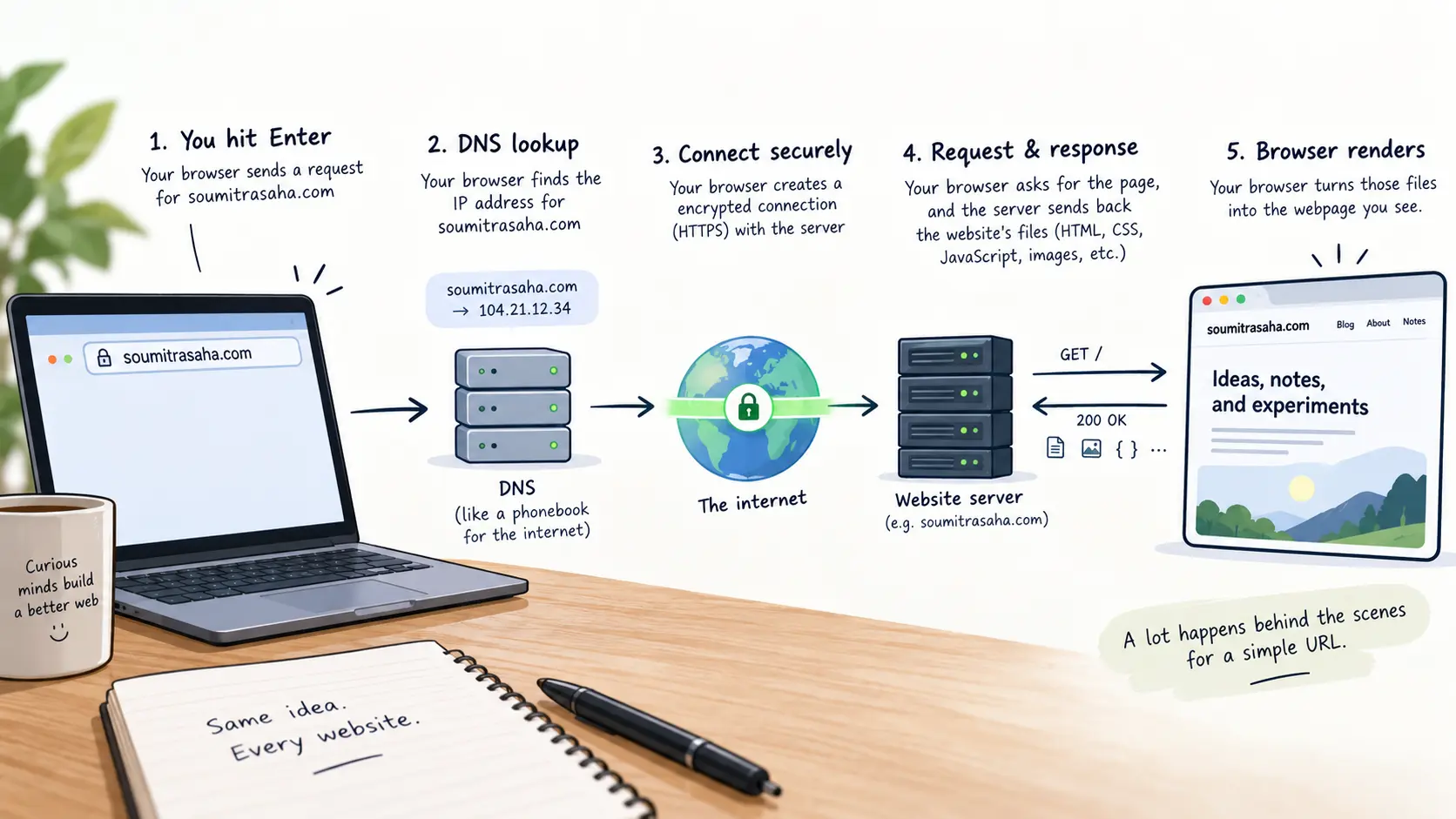
You type a URL into the address bar and press Enter. A page shows up. Between those two moments, roughly a dozen systems coordinate across the internet to turn a short string of text into the rendered page you are looking at.
Most developers use the web every day without a clear picture of what happens during that gap. That gap matters. When a page loads slowly, when an API call fails, or when HTTPS breaks on a new domain, knowing the actual request lifecycle tells you where to look first.
Quick answer: After you press Enter, the browser resolves the domain to an IP address through DNS, opens a TCP connection, negotiates encryption through a TLS handshake, sends an HTTP request, receives the response, parses HTML into a DOM tree, builds a render tree with CSS, and paints pixels to the screen. Each step can fail independently, and knowing which one failed is half the debugging work.
On this page
- DNS resolution: turning a name into an address
- TCP and TLS: establishing a reliable, encrypted connection
- HTTP: the actual request and response
- The browser rendering pipeline
- Where things commonly break
- Use the request lifecycle to debug faster
DNS resolution: turning a name into an address
The browser does not know what soumitrasaha.com means. It needs an IP address, like 104.21.32.1. The Domain Name System (DNS) handles that translation.
The lookup follows a chain:
- Browser cache — The browser checks if it already resolved this domain recently.
- Operating system cache — If the browser has no record, the OS checks its own DNS cache.
- Recursive resolver — If neither cache has the answer, the request goes to a DNS resolver, usually provided by your ISP or a public service like Cloudflare’s
1.1.1.1or Google’s8.8.8.8. - Root nameserver — The resolver asks a root server which nameserver handles the
.comtop-level domain. - TLD nameserver — The
.comnameserver points to the authoritative nameserver forsoumitrasaha.com. - Authoritative nameserver — This server holds the actual DNS records and returns the IP address.
The resolver caches the result based on the record’s TTL (time to live), so repeated visits skip most of this chain.
Try this
- Open your terminal and run
nslookup soumitrasaha.com(or any domain you choose).- Note the IP address and the server that answered.
- Run it again and compare the response time.
Expected result: The second lookup should be noticeably faster because the resolver cached the first result. The IP address should match both times unless the DNS record changed between queries.
A full uncached DNS lookup typically takes 20 to 120 milliseconds, depending on your location and the resolver. That time is invisible on a fast connection, but it adds up when a single page triggers lookups for multiple domains (CDN, analytics, fonts, APIs).
TCP and TLS: establishing a reliable, encrypted connection
Once the browser has an IP address, it needs a connection. Two protocols handle this: TCP for reliability, and TLS for encryption.
TCP three-way handshake establishes a reliable channel:
- The client sends a SYN (synchronize) packet to the server.
- The server responds with SYN-ACK (synchronize-acknowledge).
- The client sends an ACK (acknowledge).
After these three packets, both sides agree on sequence numbers and the connection is open. This takes one round trip.
TLS handshake adds encryption on top of TCP. With TLS 1.3, the current standard, the handshake completes in one round trip instead of the two that TLS 1.2 required. During this exchange, the client and server agree on a cipher suite, verify the server’s certificate, and derive the session keys used to encrypt all data that follows.
Combined, TCP plus TLS 1.3 typically costs two round trips before any application data moves. On a connection with 50ms latency, that is 100ms of waiting before the first byte of your HTML even starts traveling.
Before you continue: If the server is 200ms away (think a user in Mumbai connecting to a server in Virginia), how much time do the TCP and TLS handshakes alone consume before any HTML is sent?
The answer: roughly 400ms (two round trips at 200ms each). That delay is why CDNs and edge servers exist — they bring the server closer to the user and cut the round-trip time.
HTTP: the actual request and response
With the encrypted connection open, the browser sends an HTTP request. A typical GET request for a web page looks like this:
GET /blogs/how-the-web-works HTTP/2
Host: soumitrasaha.com
Accept: text/html
Accept-Encoding: gzip, br
The server processes the request — reads a file, queries a database, runs server-side code, or returns a cached response — and sends back an HTTP response:
HTTP/2 200 OK
Content-Type: text/html; charset=utf-8
Content-Encoding: br
Cache-Control: public, max-age=3600
The response body contains the HTML document. The status code tells the browser what happened:
| Status code | Meaning | What the browser does |
|---|---|---|
| 200 | OK | Parses the response body |
| 301 | Moved permanently | Follows the redirect URL in the Location header |
| 304 | Not modified | Uses the cached version |
| 404 | Not found | Shows an error page |
| 500 | Internal server error | Shows an error page |
Headers like Cache-Control determine whether the browser can reuse this response later without asking the server again. A well-configured cache header can eliminate the entire request on subsequent visits.
The browser rendering pipeline
Receiving HTML is not the end. The browser still needs to turn that text into pixels. This is the critical rendering path, and it has several distinct stages.
1. Parse HTML into the DOM. The browser reads the HTML top to bottom and builds the Document Object Model (DOM), a tree structure where each HTML element becomes a node.
2. Parse CSS into the CSSOM. When the parser encounters a <link> to a stylesheet or a <style> block, it builds the CSS Object Model (CSSOM). This is a separate tree that represents all the style rules.
3. Build the render tree. The browser combines the DOM and CSSOM into a render tree. This tree includes only the elements that will actually appear on the screen. Elements with display: none are excluded. Each node in the render tree carries its computed styles.
4. Layout. The browser calculates the exact position and size of every element based on the viewport size and the CSS box model. This step is sometimes called “reflow.”
5. Paint. The browser fills in pixels: text, colors, images, borders, shadows. Complex pages may split painting into multiple layers.
6. Composite. The browser combines the painted layers into the final image you see. GPU acceleration handles this step for smooth scrolling and animations.
Check this before moving on
- You can explain why a
<link>tag for CSS in the<head>blocks rendering until the stylesheet loads - You understand that JavaScript in the
<head>withoutdeferorasyncblocks HTML parsing - You know the difference between the DOM tree and the render tree
The key detail developers miss: CSS is render-blocking and JavaScript is parser-blocking by default. A stylesheet referenced in the <head> must be fully downloaded and parsed before the browser builds the render tree. A <script> tag without defer or async stops the HTML parser until the script downloads and executes. This is why you see advice to put critical CSS inline and load scripts with the defer attribute.
Where things commonly break
Each step in this chain can fail independently, and the symptoms often point to the wrong layer.
DNS failures look like the site is down. If DNS resolution fails, the browser cannot even find the server. The error message says something like “DNS_PROBE_FINISHED_NXDOMAIN.” The server might be perfectly healthy. Check whether the domain’s DNS records are configured correctly before assuming the server is broken.
Mixed content blocks resources silently. If your page loads over HTTPS but references an image or script over plain HTTP, most browsers block that resource without a visible error on the page. The console shows a mixed content warning. The fix is to serve all resources over HTTPS.
Render-blocking resources hide the real bottleneck. A page might take 4 seconds to paint, and the server responded in 200ms. The remaining time is the browser waiting for CSS and JavaScript before it can render. The network tab in DevTools shows exactly which resource blocked the critical path.
Expired or misconfigured TLS certificates break trust. An expired certificate does not just show a warning — most browsers refuse to load the page at all. The server, the DNS, and the HTML are all fine. The problem is a single expired file on the server.
| Symptom | Likely layer | What to check first |
|---|---|---|
| “Site cannot be reached” | DNS | nslookup or dig the domain |
| “Connection timed out” | TCP/Network | Server reachability, firewall rules |
| “Your connection is not private” | TLS | Certificate expiry, domain mismatch |
| Page loads but looks broken | Rendering | Console errors, missing CSS/JS files |
| Slow first load, fast reload | Caching | Cache-Control headers, asset sizes |
Use the request lifecycle to debug faster
The next time a page loads slowly or fails entirely, do not guess. Map the symptom to the layer.
Open your browser’s DevTools and check the Network tab. Every request shows its timing breakdown: DNS lookup, TCP connection, TLS negotiation, time to first byte (TTFB), and content download. Click on any request to see the exact time each phase consumed.
If DNS takes 300ms, the fix is not on your server. If TTFB is 2 seconds, the server is slow and you need to look at your backend code or database. If the content download takes too long, the response is too large and you should compress it or reduce what you send.
The mental model is simple: a web request is a chain, and the slowest link determines the speed. DNS resolves a name. TCP opens a channel. TLS encrypts it. HTTP carries the data. The browser turns it into a page. Each step has its own failure modes and its own debugging tools.
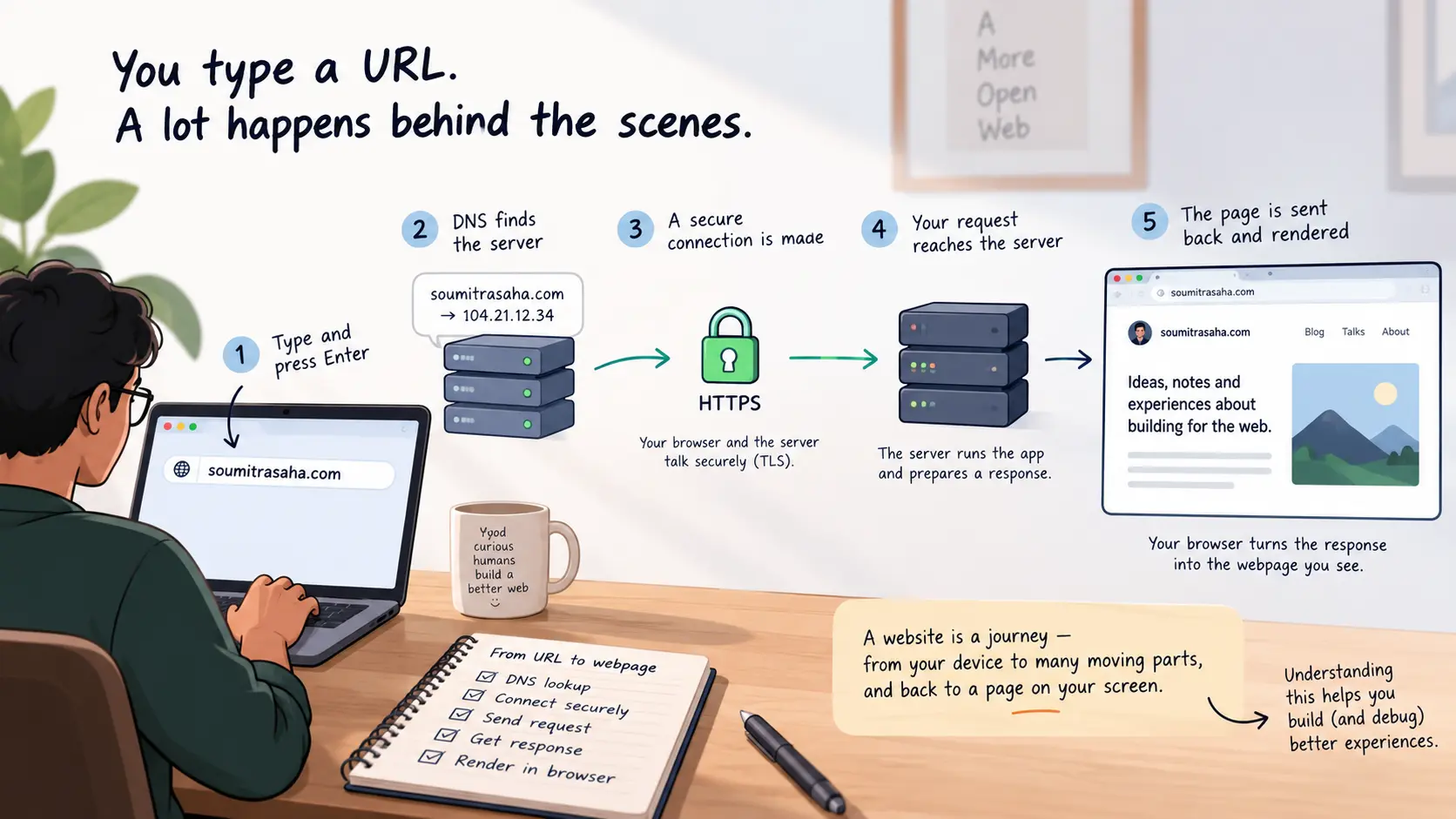
The chain as one loop: DNS finds the server, TLS secures it, HTTP carries the request, and the browser renders the response.
When something goes wrong, your job is to find which link broke. That is the practical skill this whole chain teaches you.